ON PREM 26ai DATABASE · ASM · GUI INSTALLATION
GUI Installation of Oracle AI Database 26ai with ASM on Oracle Linux 8.10
Build an ASM-backed single-instance database from Linux preparation through a verified reboot, using Oracle Grid Infrastructure, ASMCA, and DBCA.
Share on LinkedIn ↗This walkthrough installs Oracle Grid Infrastructure for a Standalone Server (Oracle Restart), creates the DATA and RECO ASM disk groups, installs the database software, and creates the orcl container database with one pluggable database, orclpdb1. The final checks confirm ASM storage, ARCHIVELOG mode, listener registration, and automatic startup after a VM reboot.
1. Understand the ASM components
ASM combines database file management with storage allocation. Instead of putting database files in an operating-system filesystem, the database stores them in ASM disk groups. ASM manages file placement and distributes file extents across the disks available in each group. When disks are added or removed, ASM can rebalance their contents.
| Component | Purpose in this installation |
|---|---|
| Oracle Restart | Starts and monitors the single-server Oracle resources and their dependencies. |
| Grid Infrastructure home | Contains ASM, the listener, ASMCA, ASMCMD, CRSCTL, and the Restart infrastructure. |
ASM instance: +ASM | Manages ASM metadata and disk groups. Database processes perform their own data I/O to the ASM disks. |
| ASMLib | Provides Linux disk labeling, discovery, and the ASM I/O interface. It is separate from the ASM instance. |
| ASM disk | An eligible block device, here a dedicated partition labeled by ASMLib. |
| ASM disk group | A named storage pool, here +DATA and +RECO. |
Database instance: orcl | Runs the database, using ASM files for its persistent storage. |
| Oracle Managed Files (OMF) | Lets Oracle generate and manage file names within the selected storage destination. |
LVM for Linux; ASM for the database
Linux uses LVM and XFS for the operating-system root filesystem. ASM uses separate raw partitions for database storage. Do not create XFS, ext4, LVM physical volumes, or operating-system mount points on the partitions assigned to ASM. The name +DATA identifies an ASM destination; it is not a Linux directory.
Redundancy and failure groups
| Disk group type | Storage behavior |
|---|---|
| External | ASM does not mirror file contents. One disk is sufficient. Storage protection must come from the underlying storage or the workload must tolerate its absence. |
| Normal | Two-way mirroring by default for most file types; at least two failure groups. Oracle recommends three failure groups for greater robustness. |
| High | Three-way mirroring; at least three failure groups. Oracle recommends five for greater robustness. |
| Flex | Supports file groups with different mirroring requirements and redundancy changes. It requires at least three disks/failure groups; its behavior is more flexible than a fixed mirror count. |
A failure group represents disks that can fail together. ASM places mirrored copies in different failure groups. Here each disk group contains one virtual disk, so we choose External redundancy. Both virtual disks reside on the same virtualization host; separating DATA and RECO does not make them independent protection against host or underlying-storage loss. See Oracle’s redundancy guidance.
2. Prepare Oracle Linux and storage
| Setting | Value |
|---|---|
| Operating system | Oracle Linux 8.10, Server with GUI |
| Kernel verified | 5.15.0-206.153.7.1.el8uek.x86_64 — UEK R7 |
| Hostname | ol8-26ai-asm |
| Compute | 4 vCPUs, 16 GiB RAM |
| Operating-system disk | /dev/vda, 100 GiB |
| DATA disk | /dev/vdb, 60 GiB |
| RECO disk | /dev/vdc, 40 GiB |
| Swap | 16 GiB |
| SELinux | Enforcing |
| Database release | Oracle AI Database 26ai, internal version 23.26.1.0.0 |
Install Oracle Linux with a graphical desktop for the installer screens. Enable networking, configure a stable hostname and address, and confirm that the hostname resolves to the intended interface. Use the VM console for graphical work and SSH for terminal commands. All Linux commands below run inside this guest.
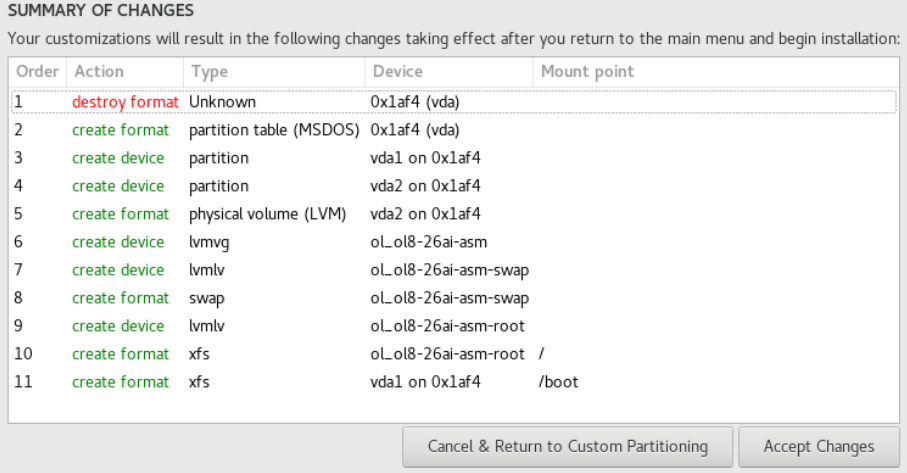
| Mount / use | Size | Layout |
|---|---|---|
/boot | 2048 MiB | Standard partition, XFS |
/ | About 82 GiB | LVM logical volume, XFS |
| swap | 16384 MiB | LVM swap |
| ASM disks | 60 GiB + 40 GiB | Separate devices, outside the OS volume group |
cat /etc/oracle-release
uname -r
hostnamectl
free -h
swapon --show
lsblk -o NAME,SIZE,TYPE,FSTYPE,MOUNTPOINT
df -hT
getenforce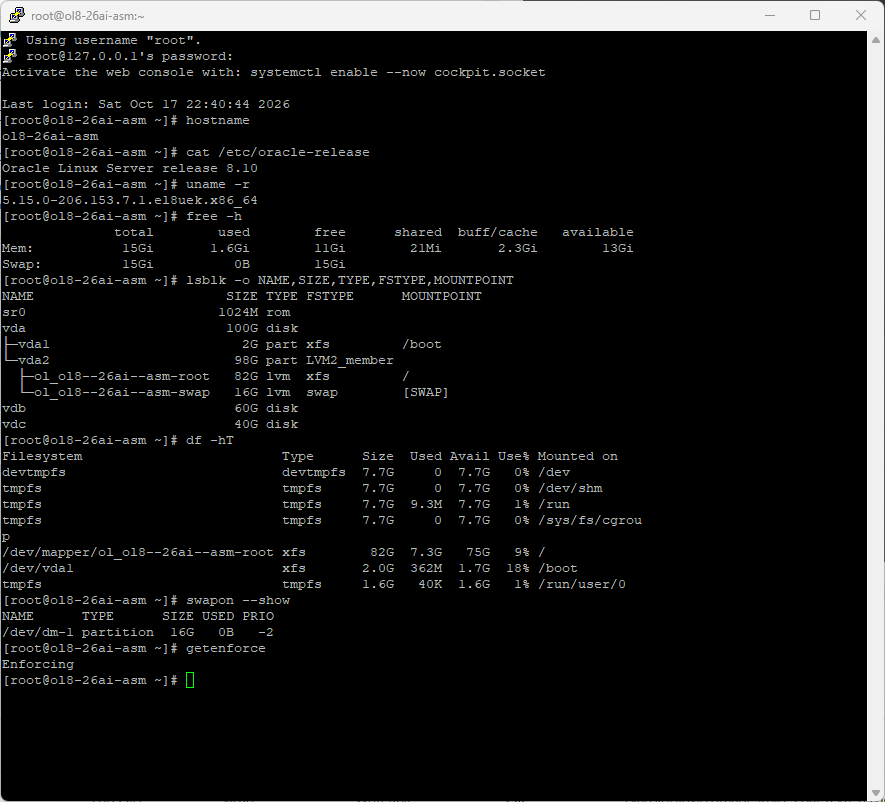
3. Create users, groups, and directories
Use grid for Grid Infrastructure and ASM administration, and oracle for database software and administration. The shared inventory group is oinstall. For a new guest, create any missing groups before creating the users. If the users already exist, adjust their memberships with usermod instead of recreating them. Numeric IDs may differ; the group roles are what matter on this single server.
# root: create only groups that are not already present
for grp in oinstall dba oper asmadmin asmdba asmoper; do
  getent group "$grp" >/dev/null || groupadd "$grp"
done

# New accounts only
useradd -g oinstall -G dba,asmadmin,asmdba,asmoper grid
useradd -g oinstall -G dba,oper,asmdba oracle
passwd grid
passwd oracle
Install the preinstallation package as root. It prepares database operating-system dependencies and settings; the database and Grid software are installed separately from ZIP images in this guide.
dnf install -y oracle-ai-database-preinstall-26ai unzip dnf-plugins-core
usermod -g oinstall -aG dba,asmadmin,asmdba,asmoper grid
usermod -g oinstall -aG dba,oper,asmdba oracle
id grid
id oracle
The asmdba group permits the database owner to authenticate to ASM as SYSDBA. The asmadmin group provides SYSASM administration. For Oracle Restart, grid also belongs to the database’s dba group so Restart can manage it. This walkthrough assigns the database’s optional specialized administrative roles to dba; separate groups can be created when backup, Data Guard, and key-management duties must be divided.
The preinstallation RPM supplies oracle’s resource limits. Provide corresponding limits for grid, then check them through fresh login sessions:
awk '$1 == "oracle" {$1="grid"; print}'   /etc/security/limits.d/oracle-ai-database-preinstall-26ai.conf   > /etc/security/limits.d/99-grid.conf
chmod 644 /etc/security/limits.d/99-grid.conf
su - grid -c 'ulimit -Sn; ulimit -Hn; ulimit -Su; ulimit -Ss; ulimit -Sl'
su - oracle -c 'ulimit -Sn; ulimit -Hn; ulimit -Su; ulimit -Ss; ulimit -Sl'
Create the distinct bases and homes with targeted ownership. A base is the owner’s administrative directory; a home contains one installed software image. Keep the Grid base outside the Grid home.
mkdir -p /u01/app/oraInventory /u01/app/grid /u01/app/26ai/grid
mkdir -p /u01/app/oracle/product/26ai/dbhome_1 /u01/software
chown grid:oinstall /u01/app/oraInventory /u01/app/grid /u01/app/26ai/grid
chown oracle:oinstall /u01/app/oracle /u01/app/oracle/product   /u01/app/oracle/product/26ai /u01/app/oracle/product/26ai/dbhome_1
chown root:oinstall /u01/software
chmod 775 /u01/app/oraInventory /u01/app/grid /u01/app/26ai/grid /u01/app/oracle /u01/app/oracle/product /u01/app/oracle/product/26ai /u01/app/oracle/product/26ai/dbhome_1 /u01/software| Directory | Role |
|---|---|
/u01/app/oraInventory | Shared Oracle inventory |
/u01/app/grid | Grid ORACLE_BASE |
/u01/app/26ai/grid | Grid ORACLE_HOME |
/u01/app/oracle | Database ORACLE_BASE |
/u01/app/oracle/product/26ai/dbhome_1 | Database ORACLE_HOME |
/u01/software | Staged ZIPs and RPMs |
4. Install and configure ASMLib 3.1
ASMLib consists of the oracleasm-support management tools and oracleasmlib library. With UEK R7 it uses io_uring; no additional oracleasm kernel module is required. This installation used oracleasm-support 3.1.1-6.el8 and oracleasmlib 3.1.3-1.el8. Obtain matching packages for your OS from Oracle’s repositories and Oracle Linux 8 ASMLib downloads.
# root
dnf config-manager --enable ol8_addons
dnf install -y oracleasm-support
# After copying the Oracle Linux 8 library RPM into /u01/software:
dnf install -y /u01/software/oracleasmlib-3.1.3-1.el8.x86_64.rpm
rpm -q oracleasm-support oracleasmlib
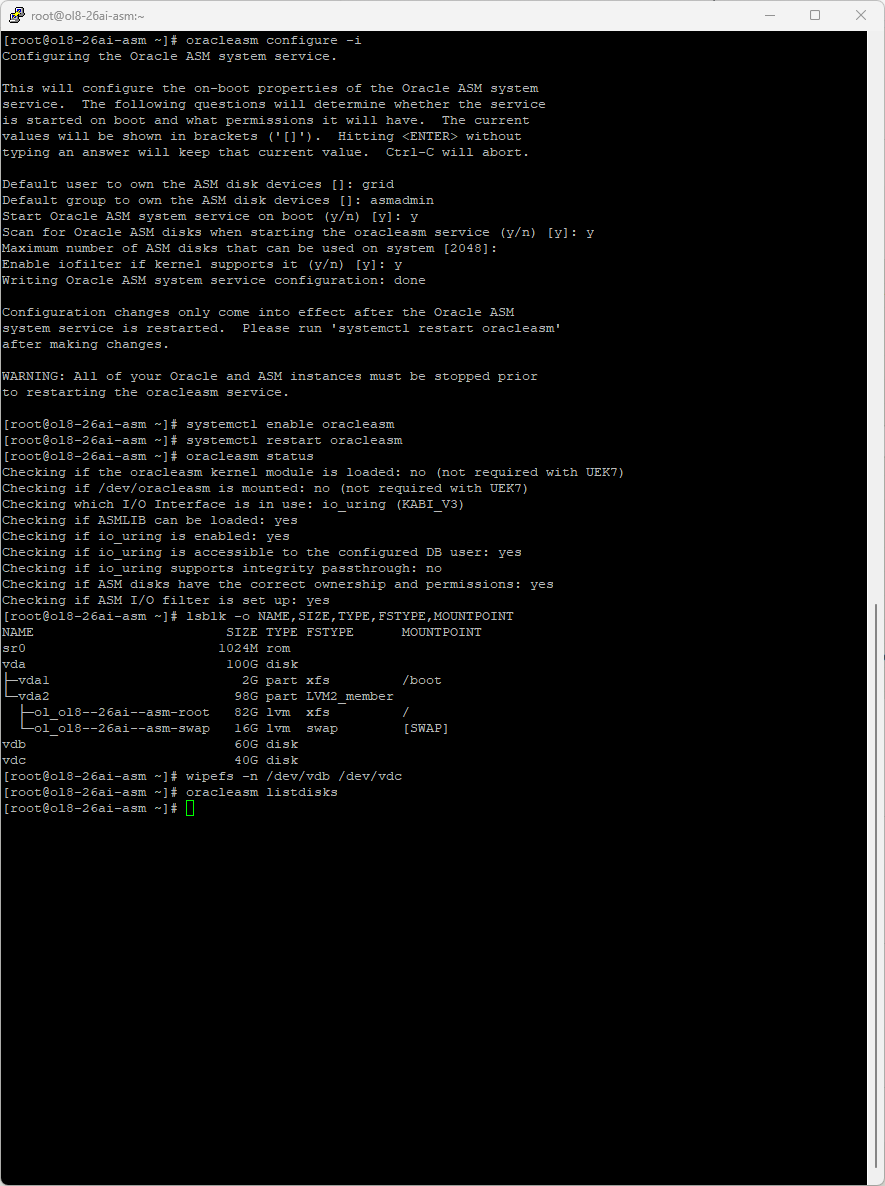
oracleasm configure -i| Configuration prompt | Choice |
|---|---|
| Device owner | grid |
| Device group | asmadmin |
| Start ASM system service on boot | y |
| Scan disks on boot | y |
| Maximum disk count | 2048 — retain the default |
| Enable I/O filter | y |
The maximum-disk value is a configuration limit, not a request to allocate 2048 disks. The I/O filter protects ASM member disks against writes from unrelated tools. Configure and start ASMLib before creating any ASM or database instance. Later ASMLib reconfiguration requires stopping its users first.
systemctl enable --now oracleasm
oracleasm status
sysctl kernel.io_uring_disabled kernel.io_uring_group
For this UEK R7 guest, kernel.io_uring_disabled = 0 means io_uring is globally enabled. A status of “kernel module not loaded” and “/dev/oracleasm not mounted” is expected when the output says those are not required with UEK7. Integrity passthrough was unavailable on this kernel; the remaining library, access, ownership, and filtering checks passed. Oracle explains these checks in its ASMLib configuration guide.
5. Partition and label the ASM disks
Identify the two dedicated, empty disks before creating their partition tables. In this guest, vda is the OS disk and must be preserved. The following partition commands apply only to the confirmed blank vdb and vdc devices; partition creation changes their contents.
# root: inspect first
lsblk -o NAME,SIZE,TYPE,FSTYPE,MOUNTPOINT
wipefs -n /dev/vdb /dev/vdc
oracleasm listdisks
Create one GPT partition on each disk, starting at a 1 MiB boundary. Label the partitions through ASMLib; do not format or mount them in Linux.
parted -s /dev/vdb mklabel gpt
parted -s /dev/vdb mkpart primary 1MiB 100%
parted -s /dev/vdc mklabel gpt
parted -s /dev/vdc mkpart primary 1MiB 100%
partprobe /dev/vdb /dev/vdc
udevadm settle
oracleasm createdisk DATA01 /dev/vdb1
oracleasm createdisk RECO01 /dev/vdc1
oracleasm scandisks
oracleasm listdisks
oracleasm querydisk -p DATA01
oracleasm querydisk -p RECO01
The labels should be DATA01 and RECO01. Oracle discovers them as ORCL:DATA01 and ORCL:RECO01. A label identifies a disk; creating the disk group is a separate step performed by Grid Setup or ASMCA.
6. Stage and extract the installation media
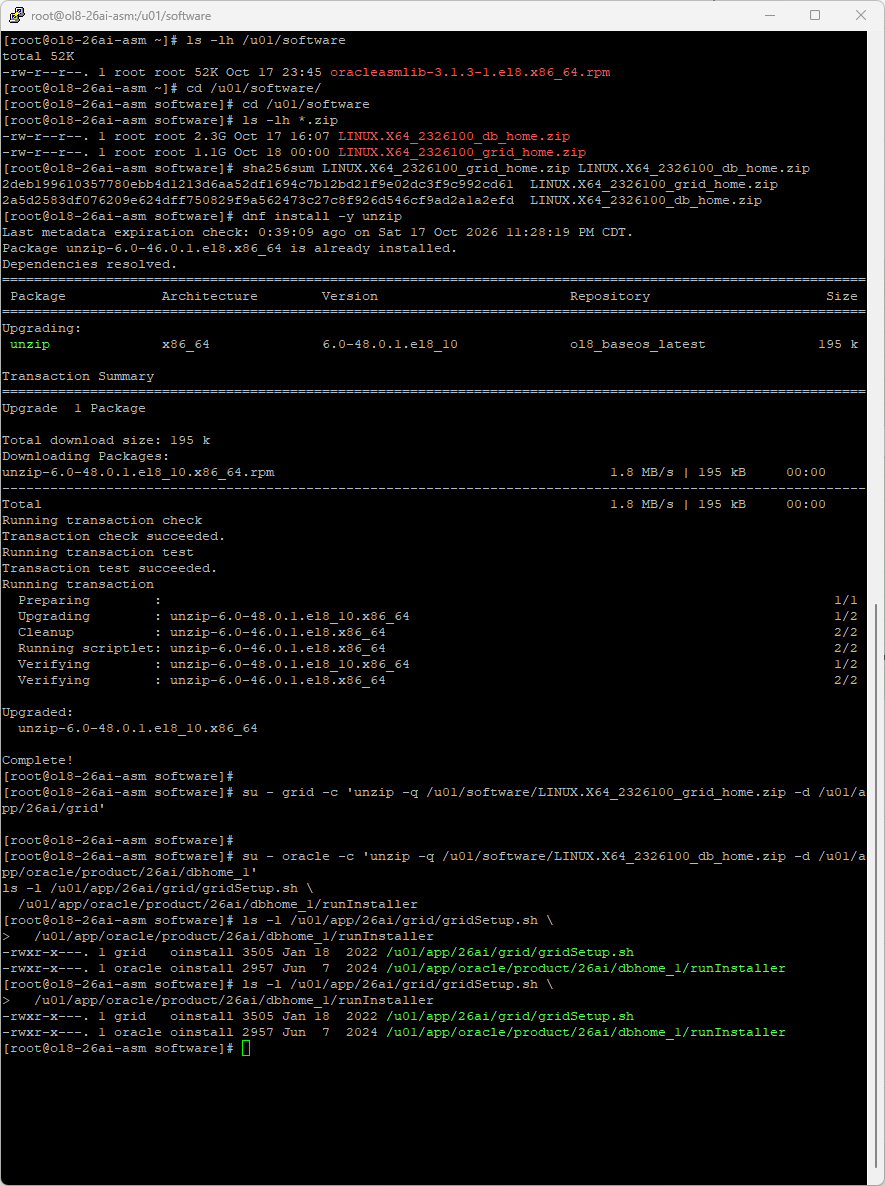
Download both Linux x86-64 images from the Oracle AI Database 26ai download page, transfer them to /u01/software, and compare their SHA-256 values with Oracle’s published values for the exact release.
cd /u01/software
sha256sum LINUX.X64_2326100_grid_home.zip LINUX.X64_2326100_db_home.zip| Archive | SHA-256 for the media used here |
|---|---|
| LINUX.X64_2326100_grid_home.zip | 2deb199610357780ebb4d1213d6aa52df1694c7b12bd21f9e02dc3f9c992cd61 |
| LINUX.X64_2326100_db_home.zip | 2a5d2583df076209e624dff750829f9a562473c27c8f926d546cf9ad2a1a2efd |
Extract each archive directly into its final home as its software owner. Ensure the staged files are readable by those users.
su - grid -c 'unzip -q /u01/software/LINUX.X64_2326100_grid_home.zip -d /u01/app/26ai/grid'
su - oracle -c 'unzip -q /u01/software/LINUX.X64_2326100_db_home.zip -d /u01/app/oracle/product/26ai/dbhome_1'
ls -l /u01/app/26ai/grid/gridSetup.sh
ls -l /u01/app/oracle/product/26ai/dbhome_1/runInstaller
dnf install -y /u01/app/26ai/grid/cv/rpm/cvuqdisk-*.rpm
The supplied cvuqdisk RPM supports Cluster Verification Utility disk discovery checks. Install the copy shipped with this Grid home. It is separate from ASMLib and does not create ASM labels or format disks.
7. Install Grid Infrastructure with the GUI
Log into the graphical desktop directly as grid. Use a separate root terminal when the installer requests root scripts. Launch:
/u01/app/26ai/grid/gridSetup.shSelect Configure Oracle Grid Infrastructure for a Standalone Server (Oracle Restart). This provides ASM and resource management for the single server. A RAC cluster uses a different installation path and requires additional nodes and cluster networking.
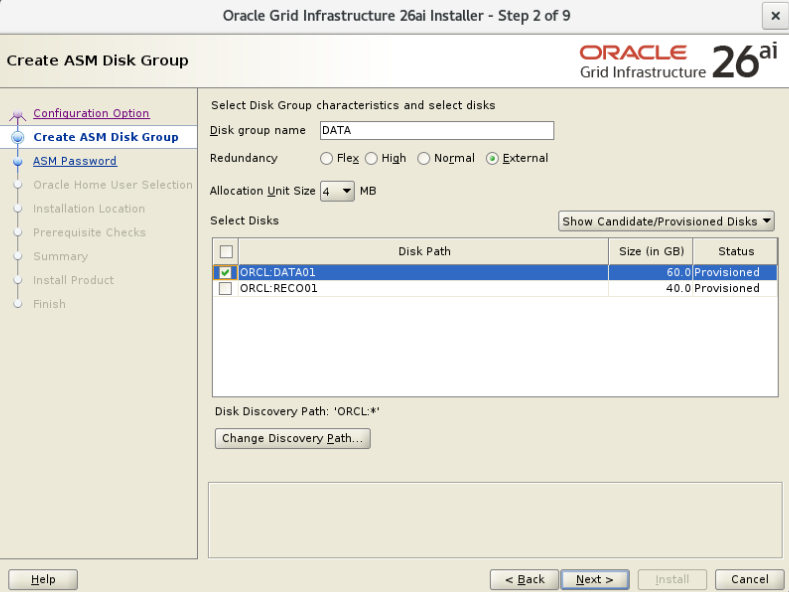
Create the initial DATA disk group
| Field | Selection |
|---|---|
| Disk group name | DATA |
| Redundancy | External |
| Allocation unit size | 4 MB |
| Disk discovery path | ORCL:* |
| Selected disk | ORCL:DATA01, approximately 60 GB |
| RECO01 | Leave unselected for the separate RECO disk group |
Use Change Discovery Path to enter ORCL:*. Select only DATA01. The allocation unit is ASM’s basic allocation unit; it is distinct from the database’s 8 KB block size. A disk with a PROVISIONED header is available for assignment to a disk group.
Passwords, groups, bases, and inventory
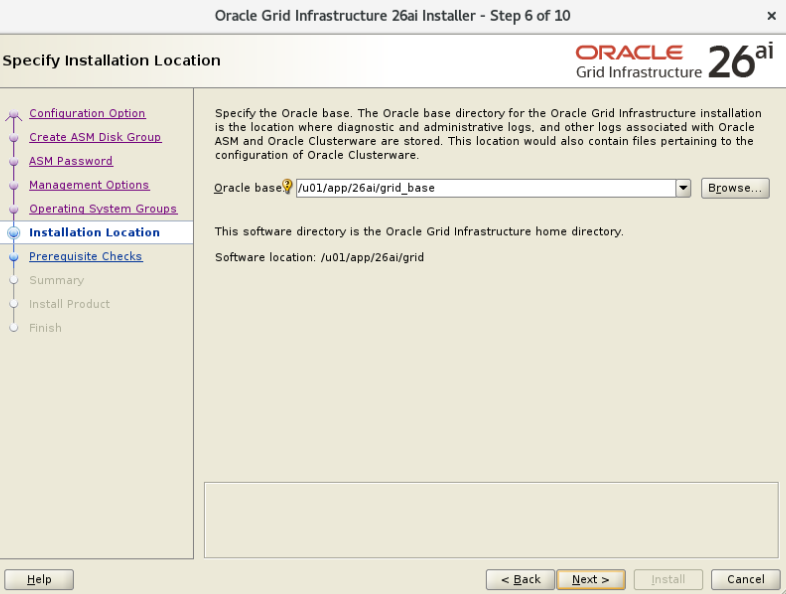
Enter the ASM SYS and ASMSNMP passwords privately. Skip Enterprise Manager Cloud Control registration for this standalone installation. Select the following groups and locations:
| Setting | Value |
|---|---|
| ASM administrator / OSASM | asmadmin |
| ASM database access / OSDBA | asmdba |
| ASM operator / OSOPER | asmoper |
| Grid Oracle base | /u01/app/grid |
| Grid software home | /u01/app/26ai/grid |
| Inventory directory | /u01/app/oraInventory |
| Inventory group | oinstall |
| Root scripts | Manual execution |
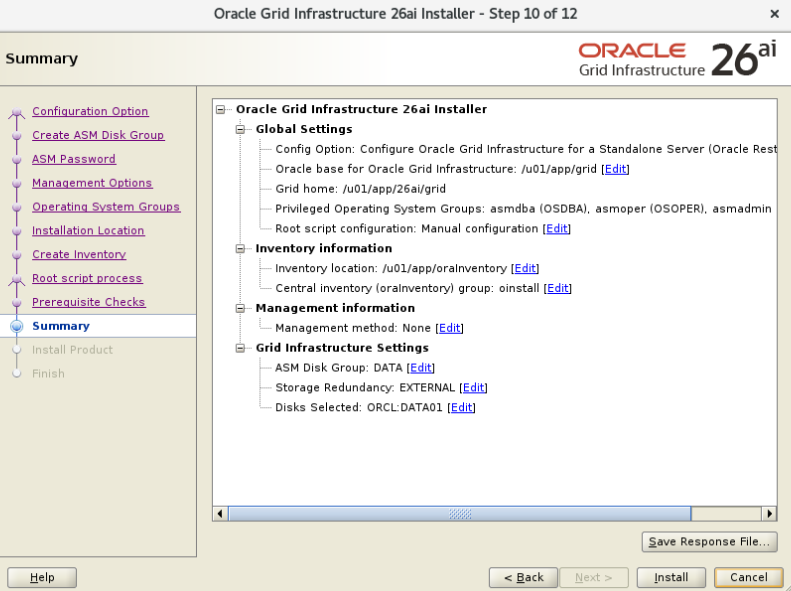
Run the prerequisite checks and resolve any unmet requirements before installing. Review the summary, including DATA01, External redundancy, the inventory, and the standalone-server choice.
Run the root scripts in order
When prompted, run the following as root:
/u01/app/oraInventory/orainstRoot.sh
/u01/app/26ai/grid/root.sh
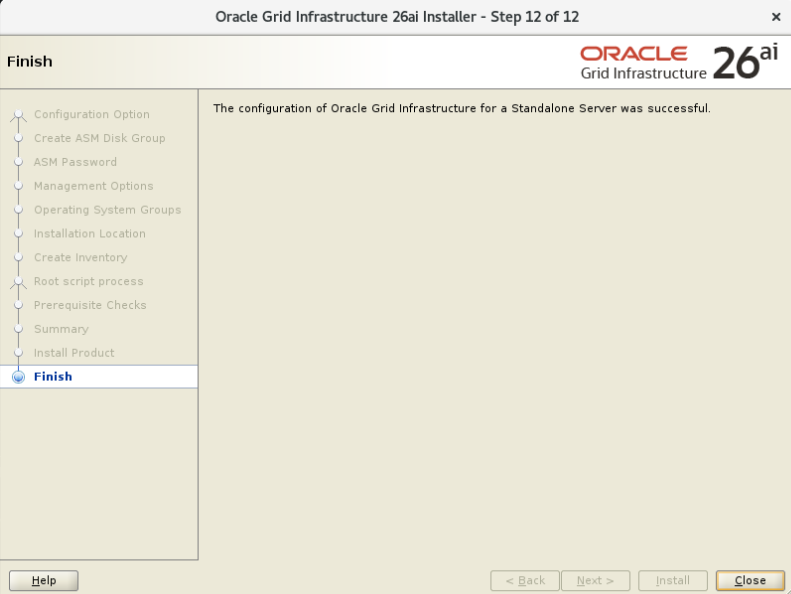
Accept /usr/local/bin for the local bin directory when appropriate. Wait for root.sh to complete; configuring Oracle Restart can take several minutes. Return to the installer and confirm completion. The installer configures the listener, ASM, and verification assistants.
8. Create the RECO disk group with ASMCA
As grid in the graphical desktop, launch ASMCA:
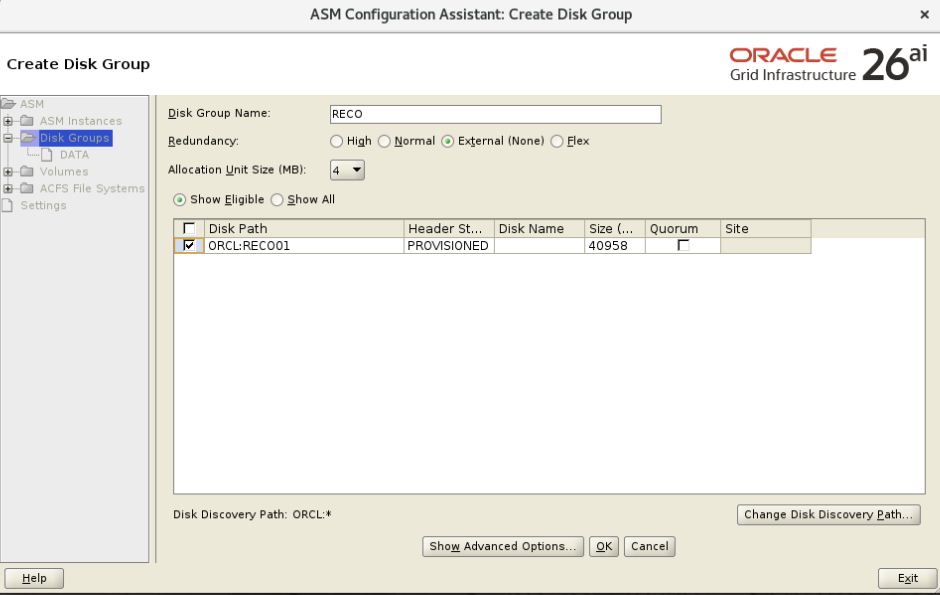
/u01/app/26ai/grid/bin/asmcaSelect Disk Groups → Create. Enter RECO, choose External (None), retain 4 MB allocation units, and select only ORCL:RECO01. Click OK and wait for creation.
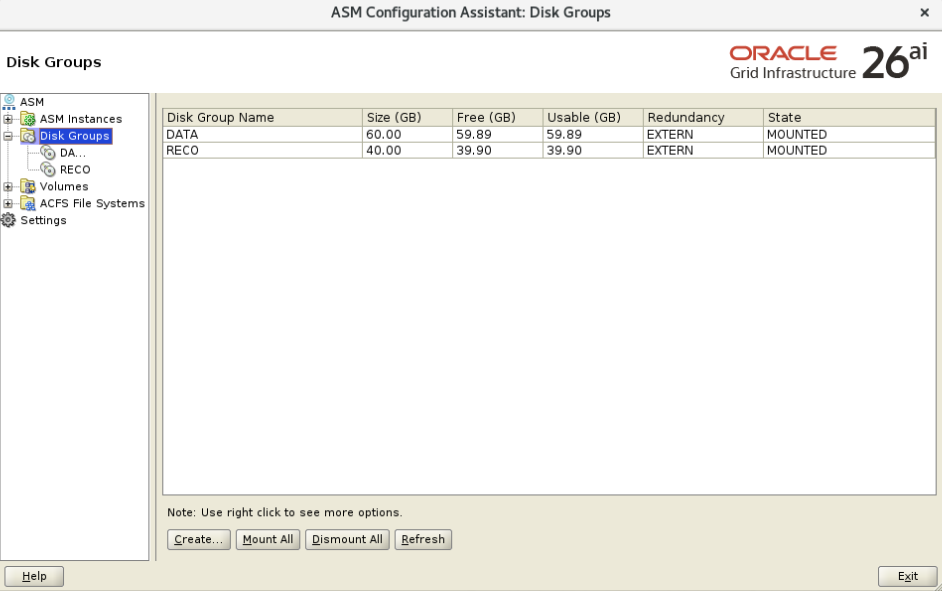
Verify that DATA and RECO are both MOUNTED. The displayed free and usable capacities are slightly smaller than the device capacities because of ASM metadata. With External redundancy, usable space does not deduct ASM mirror copies.
9. Install the database software
Log out of the grid graphical session and log into the desktop directly as oracle. This supplies oracle’s own desktop runtime environment. Launch:
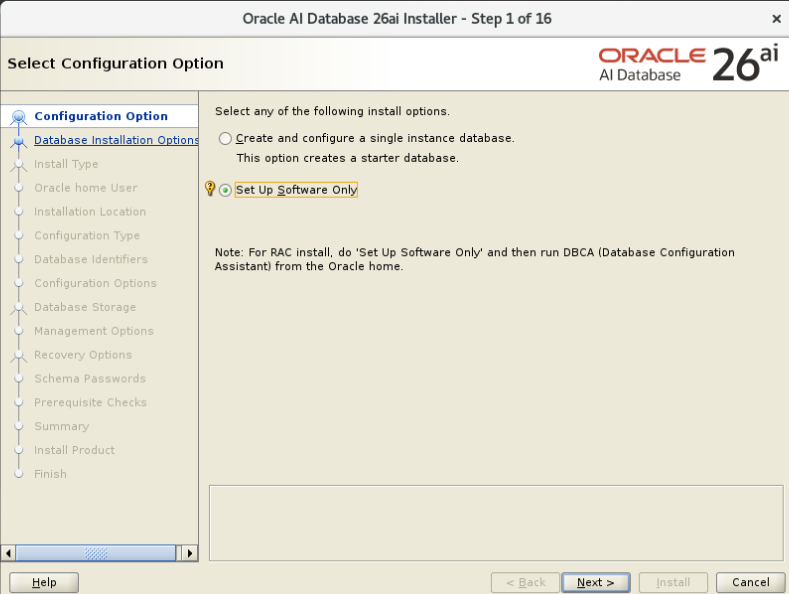
/u01/app/oracle/product/26ai/dbhome_1/runInstallerChoose Set Up Software Only, followed by Single instance database installation. This keeps software installation separate from database creation in DBCA.
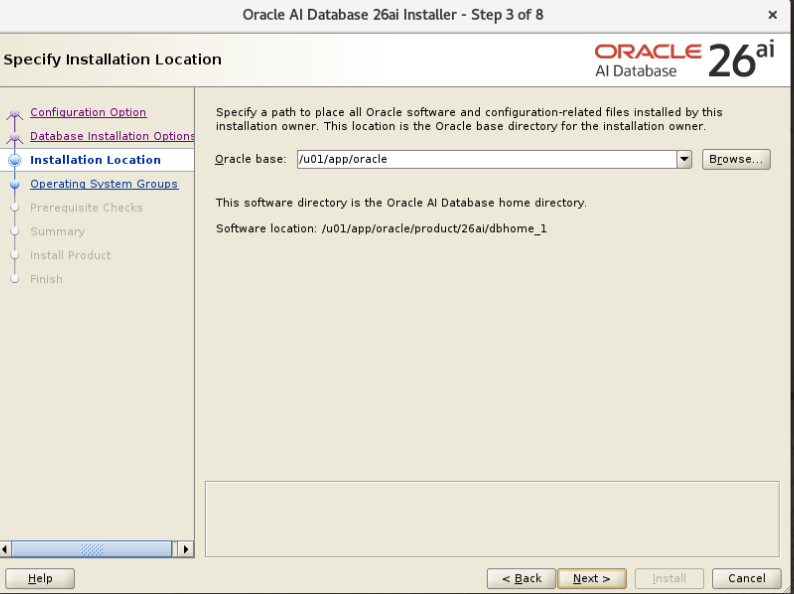
| Field | Choice |
|---|---|
| Edition | Enterprise Edition |
| Oracle base | /u01/app/oracle |
| Software location | /u01/app/oracle/product/26ai/dbhome_1 |
| OSDBA | dba |
| OSOPER | oper |
| OSBACKUPDBA, OSDGDBA, OSKMDBA, OSRACDBA | dba for this installation |
| Root configuration scripts | Run manually |
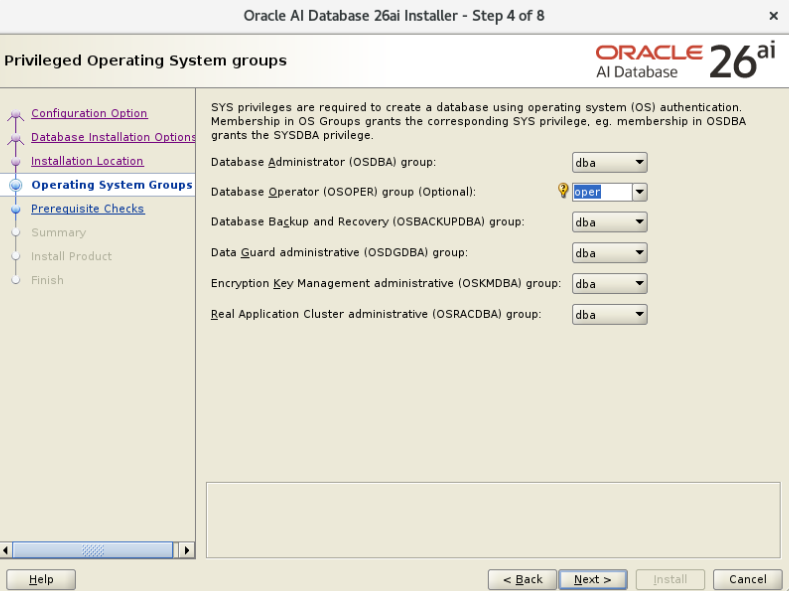
Run the prerequisite checks, review the summary, and install. When requested, run the database home’s root script as root:
/u01/app/oracle/product/26ai/dbhome_1/root.sh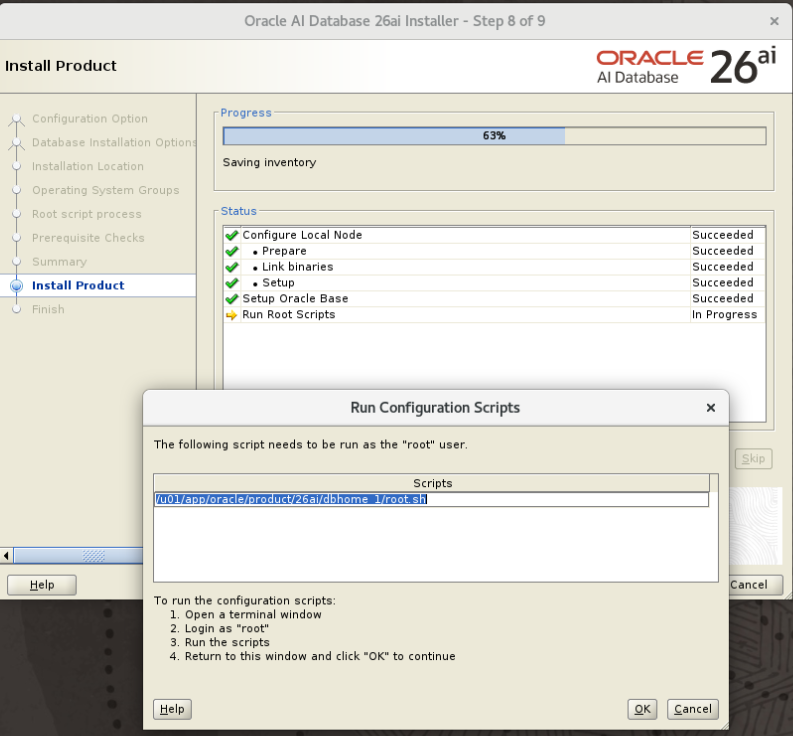
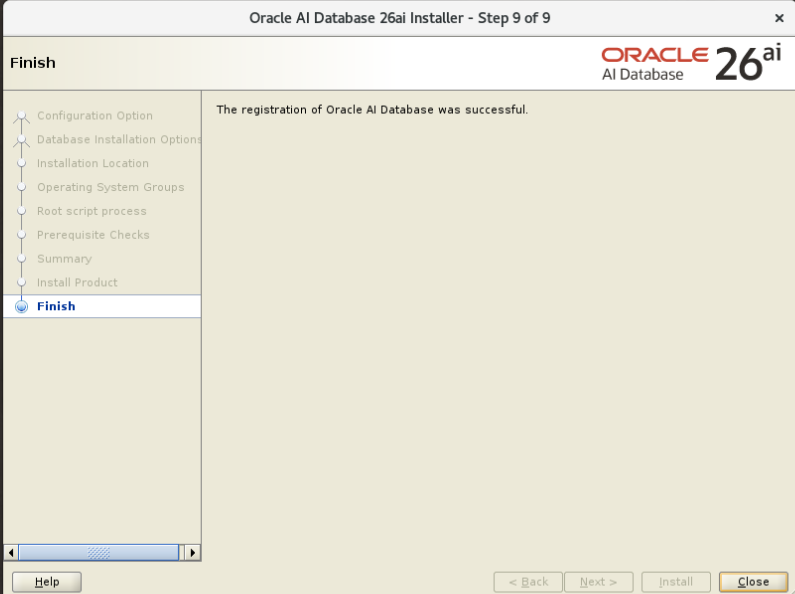
Accept the local bin directory when appropriate. Existing identical helper scripts do not need to be overwritten. After the script completes, return to the installer and click OK. Close the successful installation screen.
10. Verify database access to the ASM disks before DBCA
ASM authentication and raw-disk access are separate requirements. The oracle user belongs to asmdba for ASM SYSDBA authentication. Database processes must also have operating-system read/write access to the actual disks. Oracle documents both requirements in Authentication for Accessing Oracle ASM Instances.
This installation deliberately uses grid:asmadmin with mode 660 for the ASM partitions. Match the database executable’s effective group to that disk-access group while preserving its setuid/setgid permissions. Check these values after the database software root script and before any database instance is started. Run as root:
/u01/app/26ai/grid/bin/osdbagrp -a
ls -l /dev/vdb1 /dev/vdc1
ls -l /u01/app/oracle/product/26ai/dbhome_1/bin/oracle
For the ownership model used here, the expected executable owner and group are oracle:asmadmin, with permissions -rwsr-s--x. If its group differs, align this one executable as root, with no database instance running:
chgrp asmadmin /u01/app/oracle/product/26ai/dbhome_1/bin/oracle
chmod 6751 /u01/app/oracle/product/26ai/dbhome_1/bin/oracle
ls -l /u01/app/oracle/product/26ai/dbhome_1/bin/oracle
This is specific to the grid:asmadmin device configuration above. Oracle also documents a separated-user layout with disk group ownership asmdba; do not treat asmadmin as the required executable group for every installation. Keep device ownership, effective process groups, and permissions consistent. The oracle login itself does not need SYSASM membership for this configuration.
As oracle, verify ASM authentication explicitly with SYSDBA:
ORACLE_HOME=/u01/app/26ai/grid ORACLE_SID=+ASM /u01/app/26ai/grid/bin/asmcmd --privilege sysdba lsdgBoth disk groups should be MOUNTED. This command confirms ASM connectivity; the operating-system checks above establish the disk-access configuration used by the database executable.
11. Create ORCL and ORCLPDB1 with DBCA
In oracle’s graphical session, launch the Database Configuration Assistant:
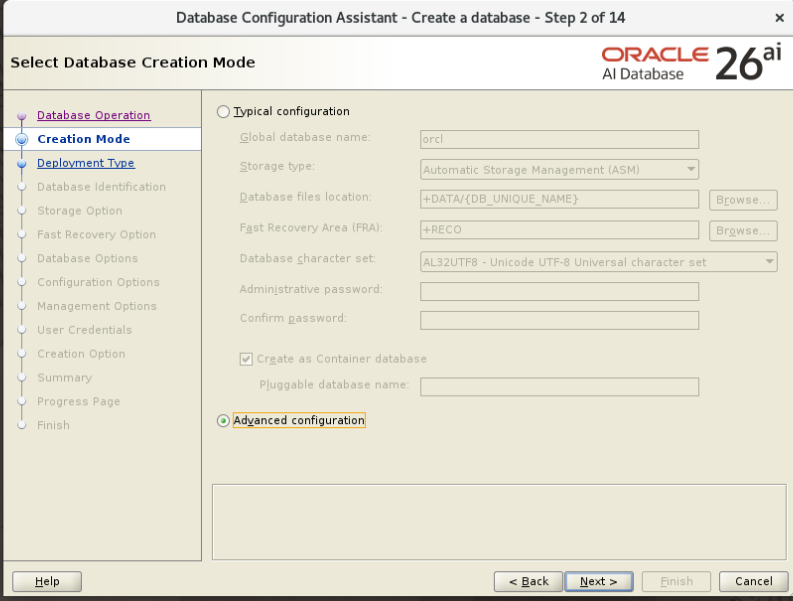
/u01/app/oracle/product/26ai/dbhome_1/bin/dbcaOperation, creation mode, and template
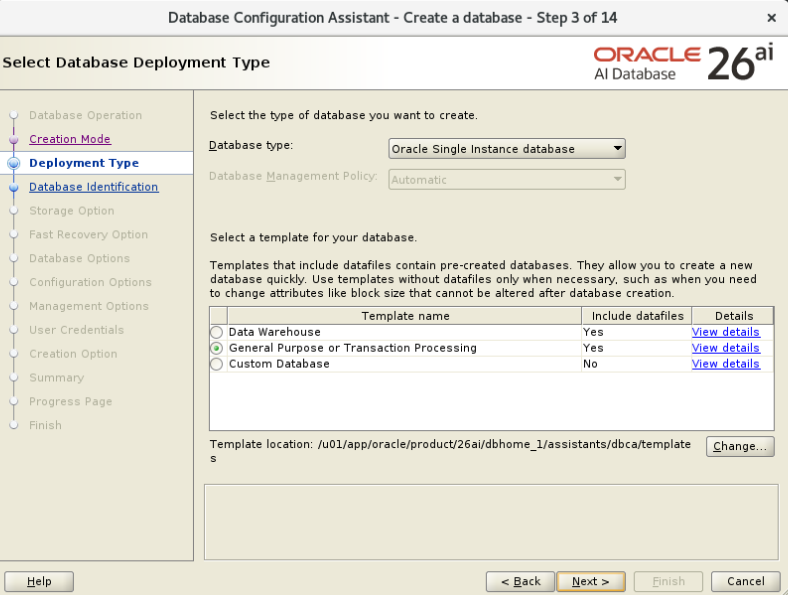
Select Create a database, then Advanced configuration. Select Oracle Single Instance database with the General Purpose or Transaction Processing template. This template includes seed datafiles for database creation.
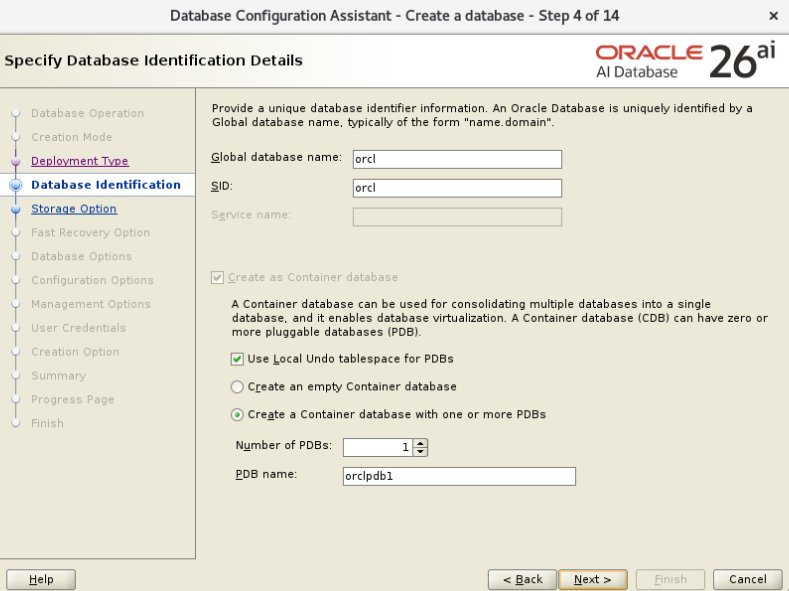
Database identification
| Field | Value |
|---|---|
| Global database name | orcl |
| SID | orcl |
| Create as Container database | Selected |
| Local Undo for PDBs | Selected |
| PDB count | 1 |
| PDB name | orclpdb1 |
The CDB contains the root, the read-only PDB seed, and the application PDB. Local Undo gives PDBs their own undo tablespaces. The SID identifies this server’s database instance.
ASM storage and Oracle Managed Files
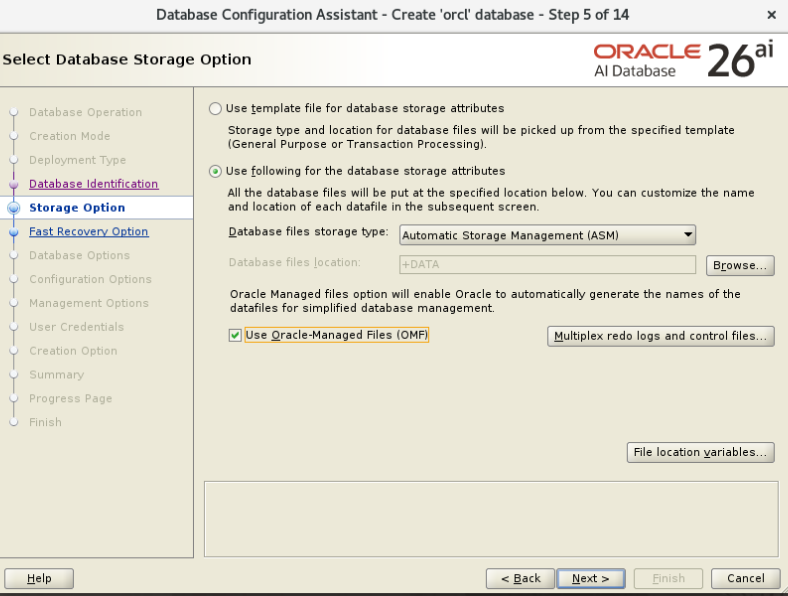
Select Use following for the database storage attributes, choose Automatic Storage Management (ASM), set the destination to +DATA, and enable Use Oracle-Managed Files (OMF). OMF lets Oracle generate the required file names. DBCA may show its {DB_UNIQUE_NAME} directory variable in the summary; it resolves to this database’s unique name.
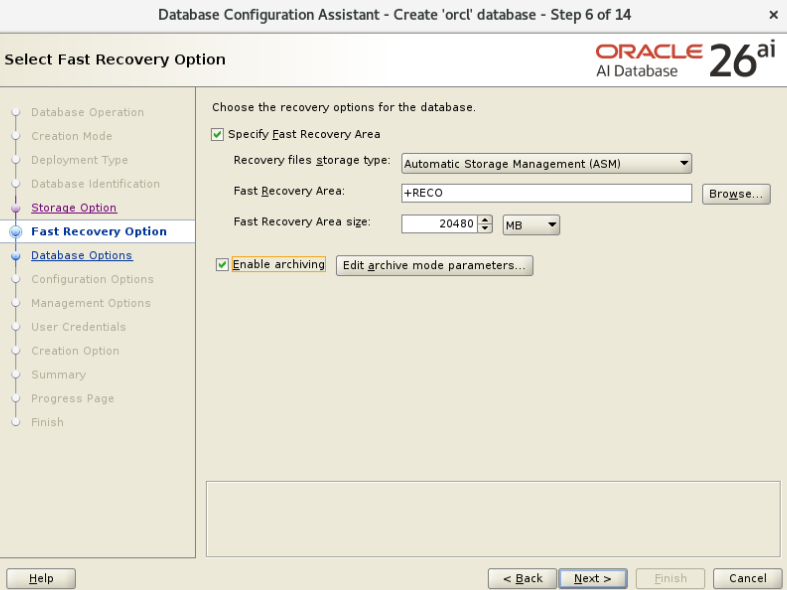
Fast Recovery Area and archiving
| Field | Value |
|---|---|
| Specify Fast Recovery Area | Checked |
| Storage type | ASM |
| Fast Recovery Area | +RECO |
| FRA size | 20480 MB |
| Enable archiving | Checked |
The FRA stores recovery-related files, including archived redo logs and backups placed there. The 20 GiB setting is a database quota inside the roughly 40 GiB RECO disk group; it does not resize or preallocate the whole group. ARCHIVELOG mode enables archived redo for recovery workflows. Monitor FRA usage and configure an appropriate backup and retention policy as the workload grows.
Listener and optional security components
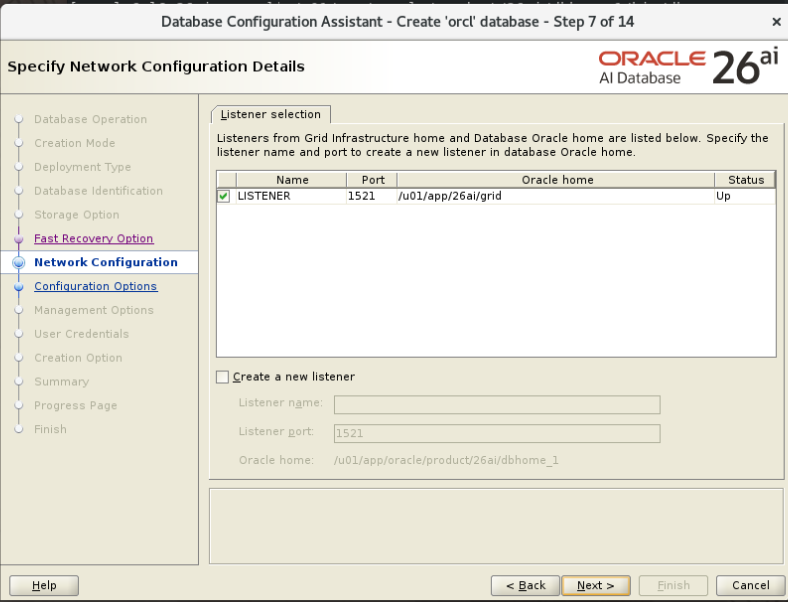
Select the existing LISTENER from /u01/app/26ai/grid, port 1521, with status Up. Leave Create a new listener unchecked. Leave Database Vault and Label Security unselected for this walkthrough.
Memory, character sets, and connections
| Setting | Value |
|---|---|
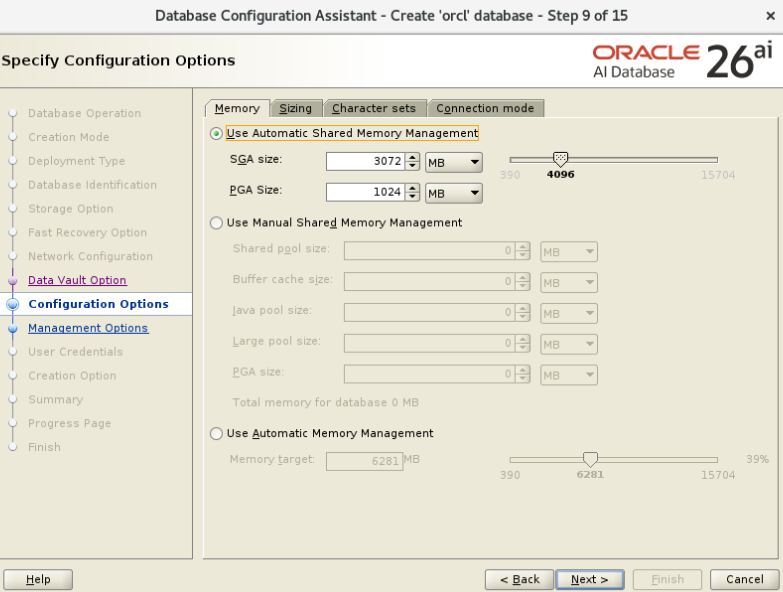
| Memory management | Automatic Shared Memory Management (ASMM) |
| SGA target | 3072 MB |
| PGA target | 1024 MB |
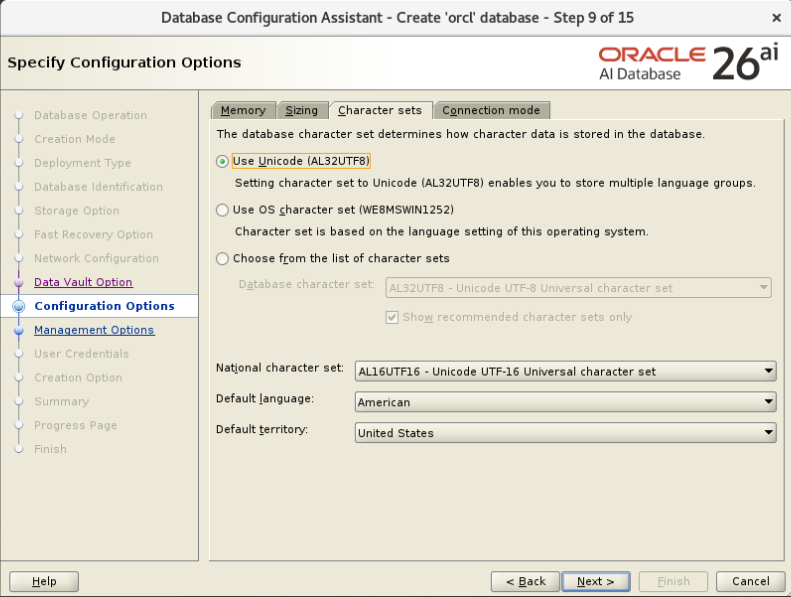
| Database character set | AL32UTF8 |
| National character set | AL16UTF16 |
| Language / territory | American / United States |
| Connection mode | Dedicated server |
ASMM manages the shared memory components within the SGA, while the PGA target is configured separately. The combined targets are 4096 MB; they are not a hard cap on every byte used by database processes. This leaves room in the 16 GiB guest for Linux, ASM, the graphical desktop, and additional process memory. AL32UTF8 supports multilingual character data; the national character set serves NCHAR-family data types.
Management, credentials, and creation
Leave Enterprise Manager Cloud Control registration unchecked. Enter your chosen SYS, SYSTEM, and PDBADMIN credentials; DBCA supports separate passwords or a shared administrative password. Keep the passwords private and out of scripts and screenshots. Select Create database, leave post-creation scripts empty, and leave template saving and creation-script generation unchecked unless you specifically need those outputs.
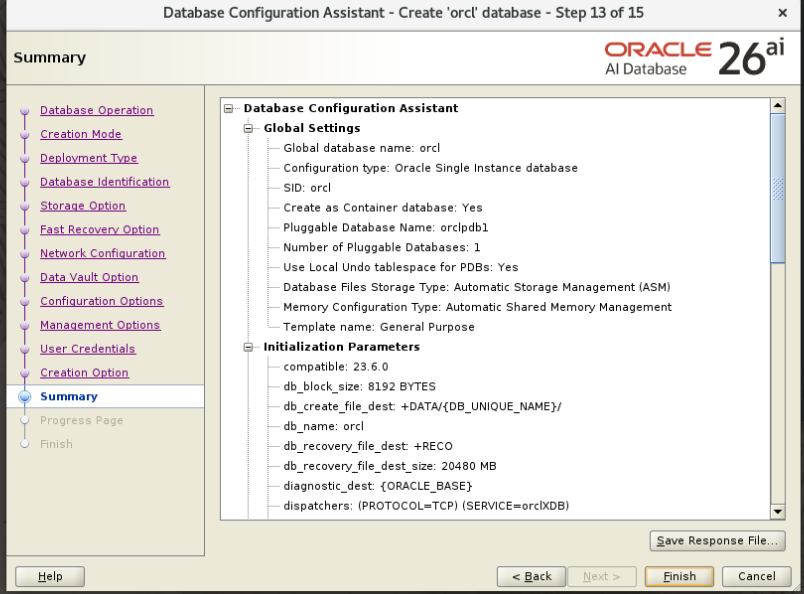
Review the summary for the database name, PDB, ASM storage, ASMM, and +RECO quota. Click Finish. Wait for database registration, seed-file copy, instance startup, database configuration, PDB creation, and post-configuration steps to complete.
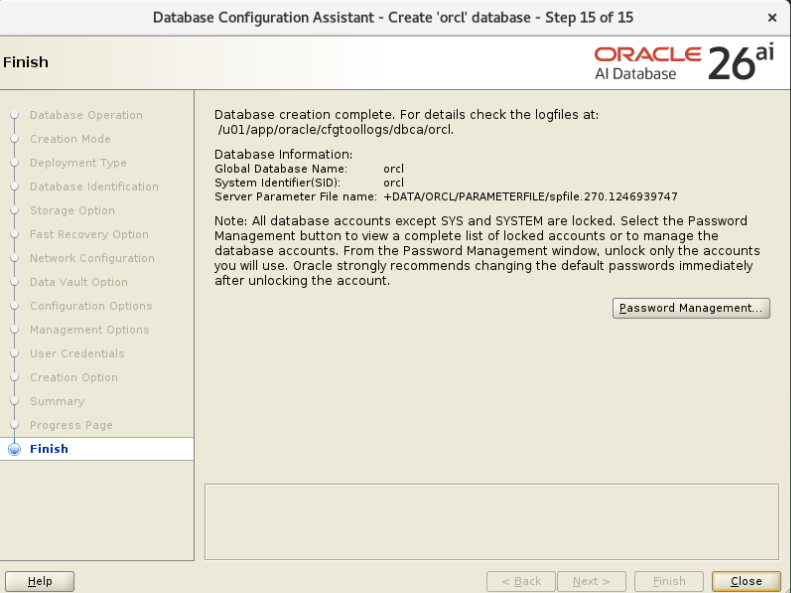
12. Verify the database, ASM files, and listener
As oracle, set the database environment and connect locally:
export ORACLE_HOME=/u01/app/oracle/product/26ai/dbhome_1
export ORACLE_SID=orcl
export PATH=$ORACLE_HOME/bin:$PATH
sqlplus / as sysdba
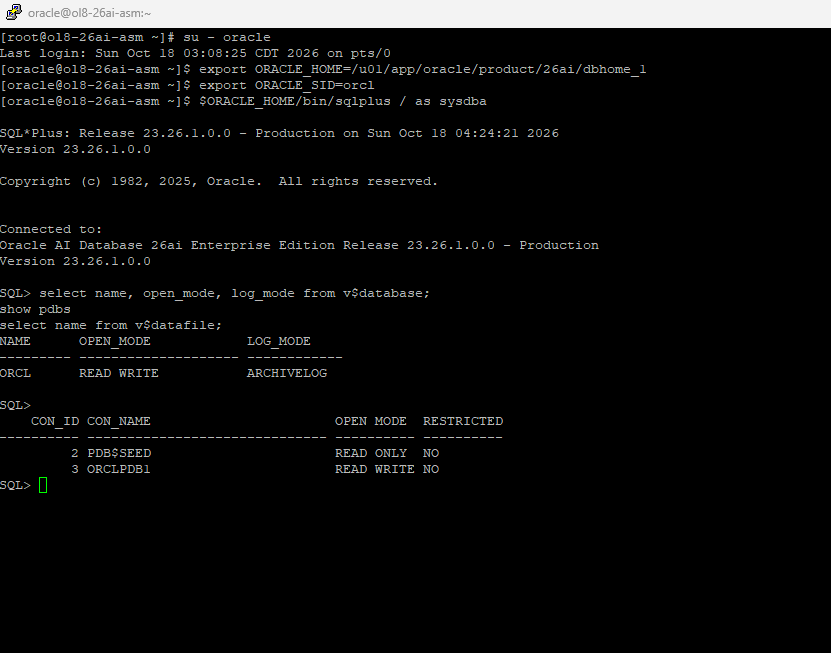
Enter SQL*Plus commands individually, waiting for the SQL prompt after each. Check the database and PDB states:
select name, open_mode, log_mode from v$database;
show pdbs| Object | Verified state |
|---|---|
| ORCL | READ WRITE, ARCHIVELOG |
| PDB$SEED | READ ONLY |
| ORCLPDB1 | READ WRITE, unrestricted |
Check file locations and save the PDB’s open state for subsequent database starts:
set lines 200
column name format a120
select name from v$datafile;
show parameter db_recovery_file_dest
alter pluggable database orclpdb1 save state;
In this installation all 11 returned datafile names begin with +DATA/ORCL/. The recovery destination is +RECO, its size is 20G, and saving the PDB state reports “Pluggable database altered.” GUID-named directories under ORCL identify the PDB storage areas.
Exit SQL*Plus and verify Oracle Restart registration:
exit
$ORACLE_HOME/bin/srvctl status database -db orcl
$ORACLE_HOME/bin/srvctl config database -db orcl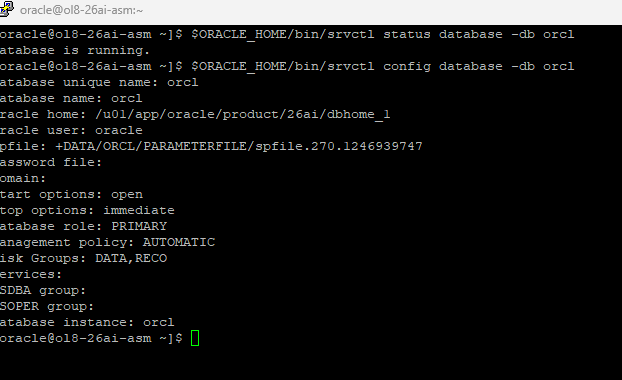
Check the Grid listener’s registered services:
/u01/app/26ai/grid/bin/lsnrctl services LISTENER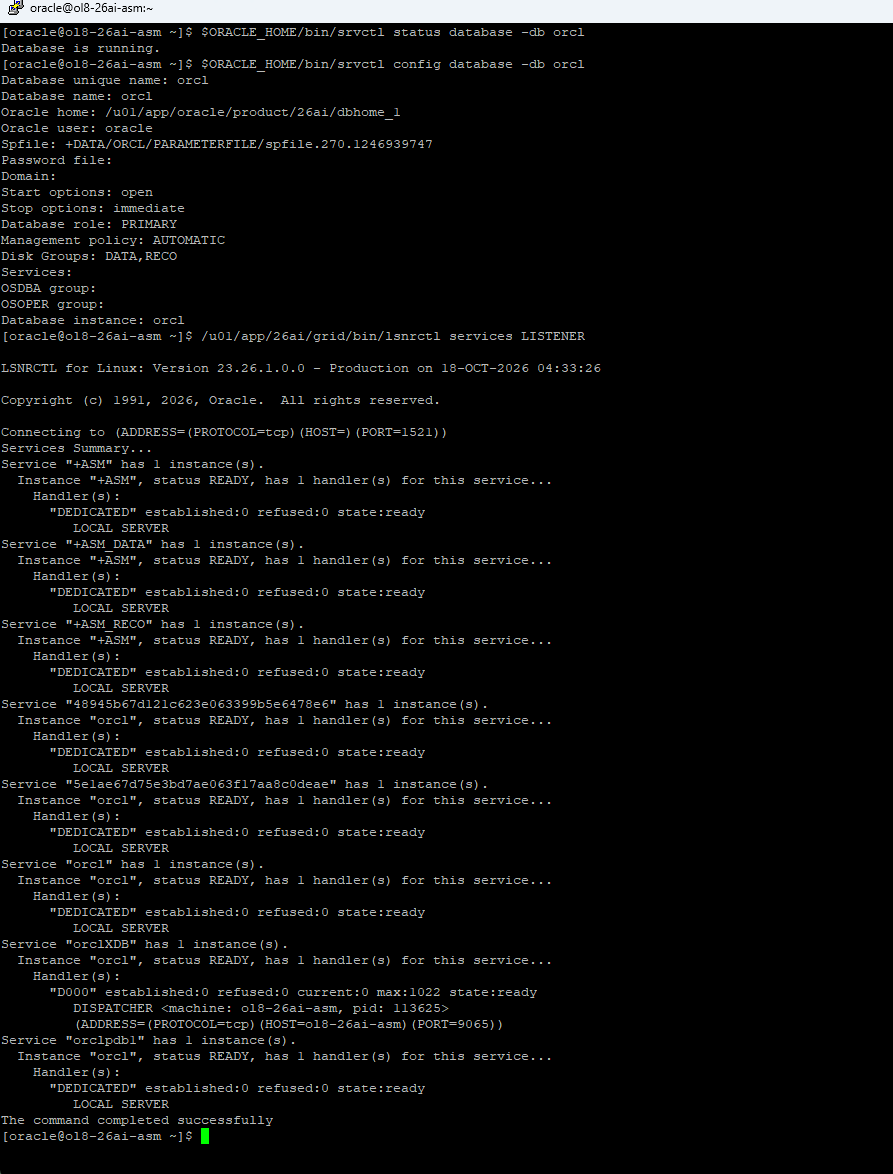
13. Verify automatic startup after a VM reboot
Oracle Restart handles automatic startup. Linux systemd starts the enabled ASMLib and Oracle High Availability Services units. ASMLib discovers its disks, and Oracle Restart brings up its dependency stack, ASM, the disk groups, the listener, and the database. The application PDB’s saved state enables it to reopen with the database.
As root, verify the services and Restart configuration before rebooting:
systemctl is-enabled oracleasm.service oracle-ohasd.service
/u01/app/26ai/grid/bin/crsctl check has
/u01/app/26ai/grid/bin/crsctl config has
/u01/app/26ai/grid/bin/crsctl stat res -t
During a suitable maintenance window, reboot only this guest:
rebootReconnect after the guest boots. Allow the Oracle stack to finish starting; the desktop or SSH login can become available before the database opens. Check resources without manually starting them:
/u01/app/26ai/grid/bin/crsctl check has
/u01/app/26ai/grid/bin/crsctl stat res -t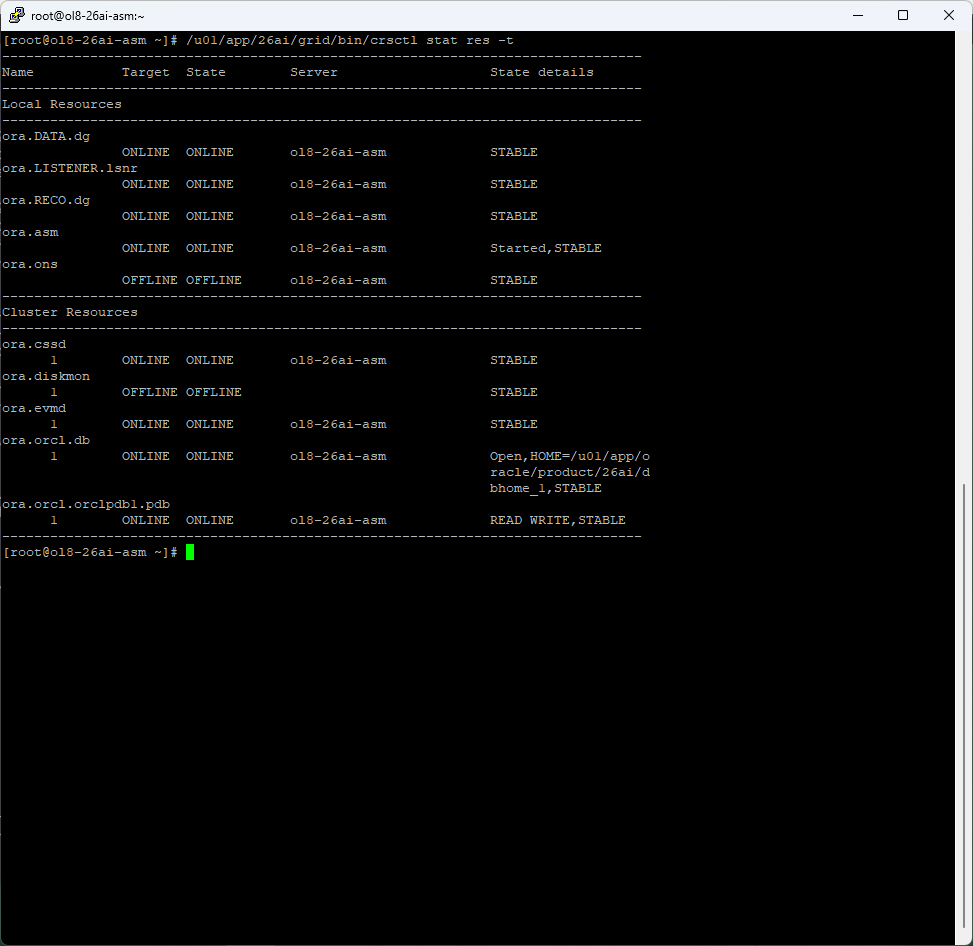
This boot test confirmed the complete dependency chain. No separate dbstart systemd unit is needed for this Restart-managed database. The virtualization host’s setting to power on the VM is a separate concern from automatic database startup inside the guest.
14. Everyday administration
Use the software owner and home appropriate to the resource. These are administrative commands for planned operations, not steps to run against the working system just to finish installation.
| Task | User | Command |
|---|---|---|
| Database status | oracle | $ORACLE_HOME/bin/srvctl status database -db orcl |
| Stop database | oracle | $ORACLE_HOME/bin/srvctl stop database -db orcl -stopoption IMMEDIATE |
| Start database | oracle | $ORACLE_HOME/bin/srvctl start database -db orcl |
| ASM status | grid | /u01/app/26ai/grid/bin/srvctl status asm |
| Disk group capacities | grid | ORACLE_HOME=/u01/app/26ai/grid ORACLE_SID=+ASM /u01/app/26ai/grid/bin/asmcmd lsdg |
| Resource overview | grid or root | /u01/app/26ai/grid/bin/crsctl stat res -t |
Before planned guest maintenance, stop the database cleanly with SRVCTL. When bringing down the entire Oracle stack, coordinate resource shutdown through Oracle Restart rather than killing its processes. Root manages the High Availability Services stack; routine database operations use oracle. Monitor free space in both disk groups and the database FRA quota, and keep recoverable backups outside the same underlying storage failure domain.
The finished installation has separate Grid and database homes, ASMLib disk discovery, DATA for database files, RECO for recovery files, an open CDB/PDB, and a verified boot sequence. For a filesystem-based alternative, see the silent Oracle 26ai installation guide.
Oracle documentation
- Oracle AI Database 26ai downloads and checksums
- Oracle 26ai preinstallation RPM
- Installing and upgrading ASMLib
- Configuring ASMLib, I/O filtering, and disk labels
- ASM authentication, separated roles, and disk permissions
- ASM mirroring and disk group redundancy
- ASM storage requirements
- Oracle Restart administration
Comments
Have a question or something to add? Share it below.
Leave a comment
Your name and comment will be public. Automated spam checks run before posting. Please keep comments relevant and leave out passwords or private details.